A Better and Cheaper Alternative to Slack for Membership Communities
8 minute readIf you are building a membership community, you have probably considered using Slack.
It is a widely used platform, especially in professional environments, remote teams, and startup communities. Many people are already familiar with how it works, which makes it feel like a practical option for bringing members together.
Slack can be a fantastic choice depending on the way you use it and your type of business. Slack was built to make remote work easier and connect teams to streamline work processes, however, it was not built for creators looking to sell access to a paid community and deliver content behind a paywall.
Many creators fall into the trap of picking a platform based on its popularity, but in the case of Slack, it was not built for this kind of industry. And while it can definitely work with a few workarounds, it is not the best choice for creators looking to monetize their content.
A membership community is not only about conversation. It also involves content delivery, onboarding, payments, structure, and a clear experience for your members. Slack was simply not designed for that.
One of Slack's main limitations for creators is cost. Slack pricing is based on how many members you have, which directly affects how your community can grow.
In this guide, we will look at how Slack works for membership communities, where it fits well, and where it creates friction. Then we will look at why a tool like Heights Platform can be a better fit when your community is part of a product or business.
What is Slack?
Slack is a communication platform built for teams. It organizes conversations into channels, where people can send messages, share files, and respond in threads.
Channels can be public or private, and you can invite members to specific channels based on their role or access level.
Slack also includes direct messages, notifications, integrations with other tools, and search functionality to find past conversations.
For internal teams, this works well. People use Slack to coordinate projects, ask quick questions, and stay updated on ongoing work.
Because of this structure, many creators started using Slack for communities, coaching groups, masterminds, and memberships.
For this purpose, it feels organized at the beginning. You can create channels for different topics, set up a welcome channel, and invite members into the space.
But Slack is still designed for team communication, not for running a membership business. That pricing model also reflects how Slack is used. It is designed for teams with a relatively fixed number of members, not communities that are meant to grow over time.
That difference becomes clearer as your community grows.
Pros and Cons of Using Slack for a Membership Community
Slack works well when your main goal is structured conversation. You can create channels for specific topics, keep discussions organized, and use threads to avoid clutter. Compared to fast-moving chat platforms, Slack feels more controlled and easier to follow.
Slack works well when the number of people in the space stays predictable. This is where things start to change for membership communities.
The biggest downside of all for using Slack as a membership community vs using it as a place to organize your work, is pricing.
Slack can become really expensive really fast. That is because Slack charges you based on how many members are in your team. And that works fine for workplaces with a set amount of team members that doesn't grow too much over time.
But if you are a creator, you want your membership to grow!
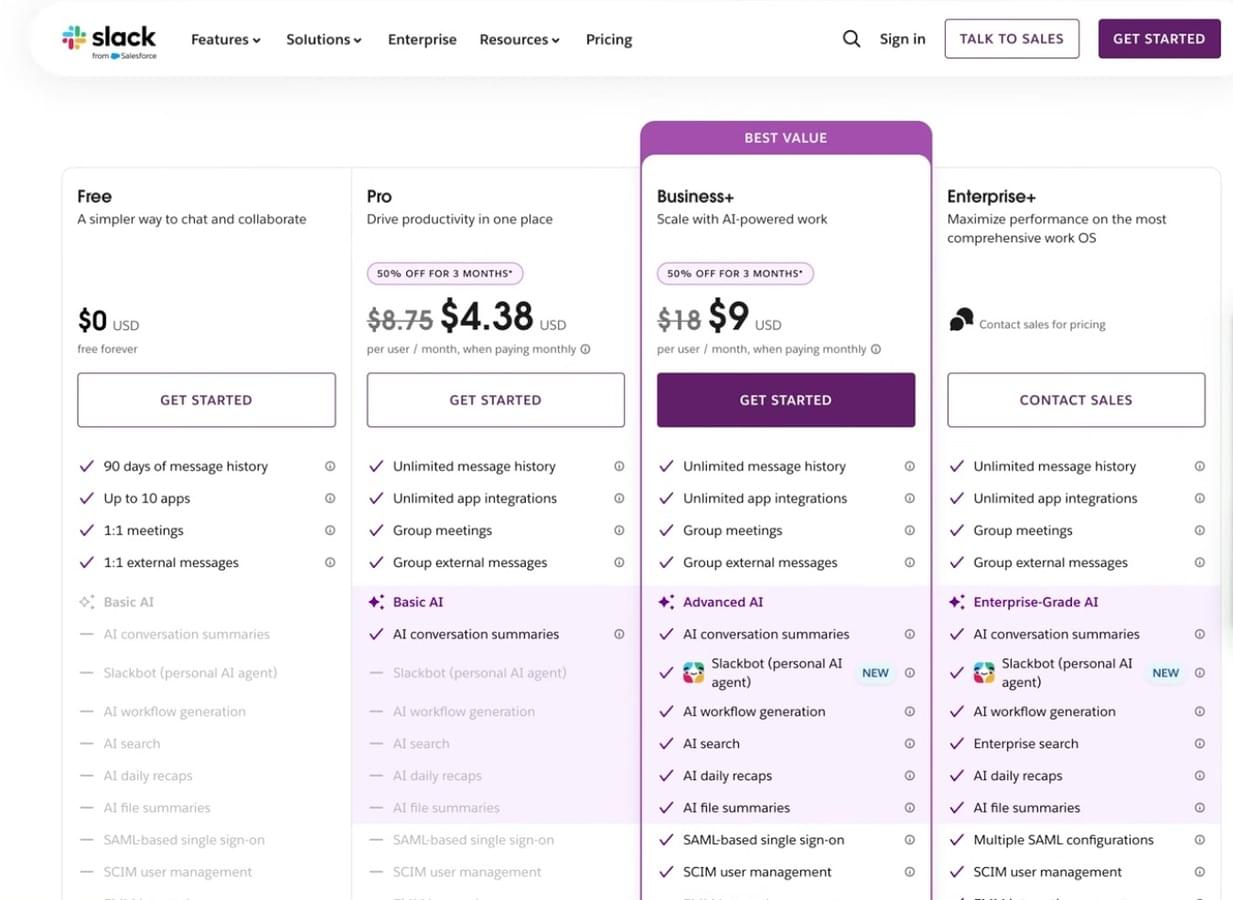
While Slack does offer a free plan, its feature are limited for creators. In order to run a profitable membership community in Slack, you'd need at least the Pro plan, where you can have unlimited message history and group meetings.
Slack charges around $9 per member (per month, which can amount to a really expensive bill as your community grows.
Let's say that your community grows to 5,000 members in one year. That is a great number and many creators aspire to achieve this and more to keep their membership profitable.
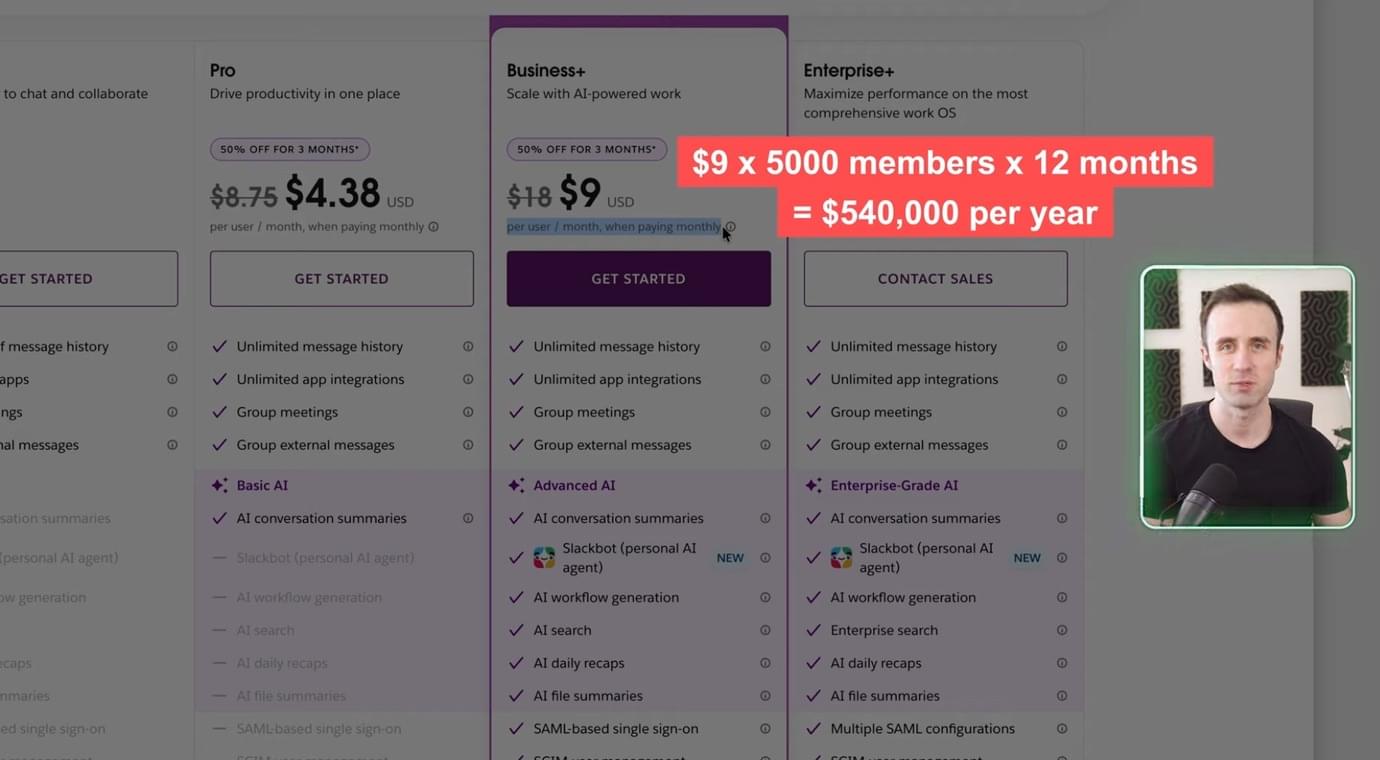
This would amount to $540,000 per year that you pay to Slack!
You'd likely agree this is a really expensive bill for most creators, and even if you charge a high price for your community access, it is still a big chunk of revenue that you lose.
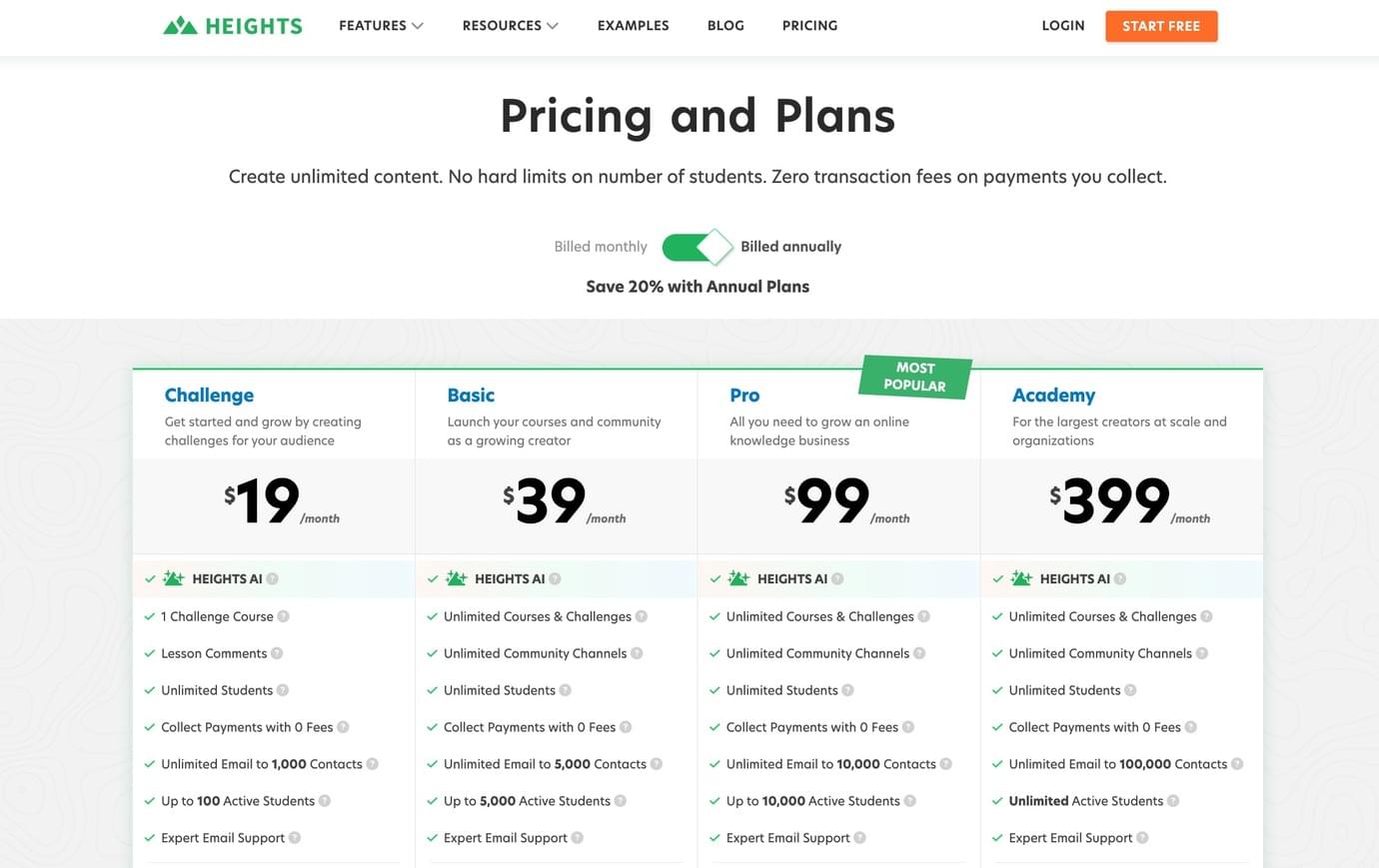
If you used a platform like Heights, with fixed monthly prices and unlimited members, you'd only pay $468/year on the Basic plan (which offers everything you need to run a profitable membership community!).
In terms of features, Slack does not provide a structured way to deliver content.
If you are offering courses, digital downloads, or coaching programs, you need another platform to host and sell those materials. Slack becomes the place for discussion, but not the place where the actual experience happens.
Secondly, content gets lost over time.
Even with search, older conversations, resources, and important answers become harder to find. New members often ask the same questions because they cannot easily navigate what already exists.
Third, onboarding is limited.
New members usually enter a workspace with many channels and messages already in progress. Without a guided structure, it takes time for them to understand where to go, what to read, and how to participate.
Another important limit is monetization.
Slack does not handle payments or memberships directly. That means you need separate tools for selling access, managing subscriptions, and controlling who can join or stay in the community.
You also need to manually manage access when people cancel or change plans.
At the same time, pricing becomes harder to manage as your community grows. Because Slack charges per member, every new person increases your monthly cost. This creates a situation where growth also increases your expenses in a direct way.
Branding is also minimal.
Your community exists inside Slack’s interface, with limited control over how it looks or feels. For some use cases this is fine, but for paid memberships or premium programs, it can feel disconnected from your brand.
Start Free TodayA Better Alternative to Slack for Creators
Running a membership community usually requires more than a simple interface for communication.
This is where Heights Platform becomes a better fit for creators.
Heights is built to bring your community, course content, digital products and business tools into one place.
Instead of using Slack for discussion and separate tools for everything else, you can run your entire membership business inside one platform.
This changes how your community works in practice. When a member joins your program, they are not entering a workspace full of ongoing conversations. They are entering a structured, branded environment where everything is connected.
They can access the content they purchased, see the community spaces linked to that content, and understand where to start.
Inside Heights, the experience begins with a customizable dashboard.
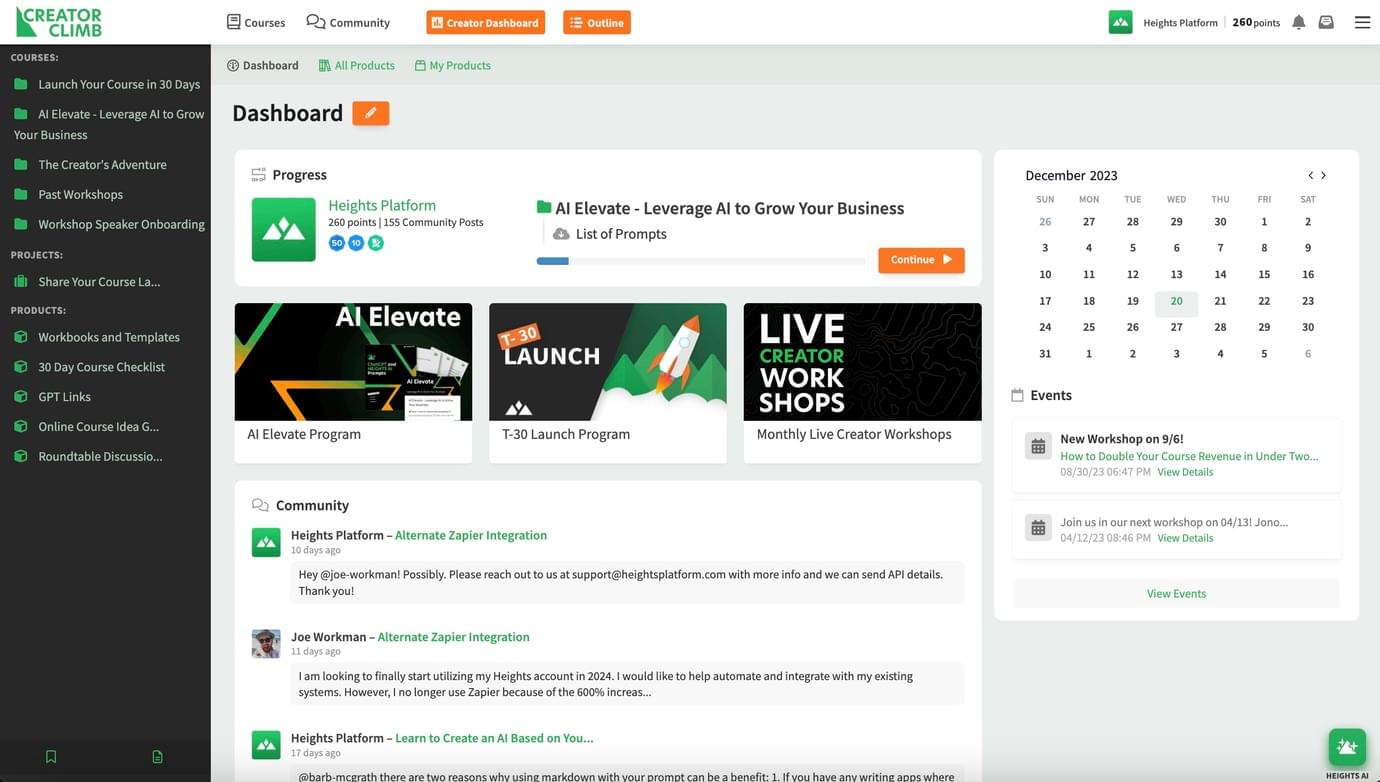
You can decide what members see first. This could be a course, a welcome guide, a community area, or a combination of these. This helps new members orient themselves immediately.
The community itself is organized through channels and channel groups.
Channels are used for specific discussions, and channel groups allow you to structure them into clear sections. This makes it easier to navigate, especially as your community grows.
You can also control access in a more precise way. For example, you can include certain community areas inside specific offers, and set them as private. A basic membership might include general discussions, while a higher tier unlocks private channels or coaching offers.
This is handled automatically based on what the member has purchased.
You can also decide to turn your community into a lead generation machine, with a feature called Public Community!
This allows Google to index community posts shared in free (open) channels, the same way as publishing a blog post.
Public community areas can be indexed by search engines, which means your content and discussions can bring new people into your ecosystem.
Your online courses, paid resources, and digital products live alongside the community, so members do not need to switch between tools and handle complex log ins.
This reduces confusion and keeps engagement inside one place. Heights also gives you more control over community moderation.
You can approve posts, lock discussions, and manage how conversations happen inside each channel. AI tools can assist with moderation, which helps when the community becomes more active.
Another important difference is branding. Your community lives inside your own program, with your own domain, logo, and structure. This creates a more consistent experience for members, especially when your community is part of a paid offer.
Heights also includes built-in tools for live sessions. You can host live streams and meetings directly inside your program, without sending members to external platforms.
Related articles:
- Best Online Course and Community Platforms [All-in-One Platforms for Creators]
- How to Launch an Online Community With AI in 6 Steps
- How to Build a Brand Community That Thrives
Feature Comparison Table: Heights Platform vs Slack
| Features | Slack | Heights Platform |
|---|---|---|
| Community | Yes | Yes |
| Organized channels | Yes | Yes |
| Structured content (courses + resources) | No | Yes |
| Paid memberships | No | Yes |
| Integrated payments / checkout | No | Yes |
| Website builder | No | Yes |
| Email & CRM | No | Yes |
| Live meetings | Limited | Yes |
| White-label branding | No | Yes |
| AI moderation | No | Yes |
| Custom domain | No | Yes |
| Bundle community with offers | No | Yes |
| Pricing | Around $8/month per members | Fixed price from $39/month |
How to Create a Membership Community Inside Heights
In Heights, the community is not separate from your product. It is part of it. You build your membership around offers.
An offer is a combination of courses, digital products, and community spaces that you sell together.
This allows you to define exactly what each member gets.
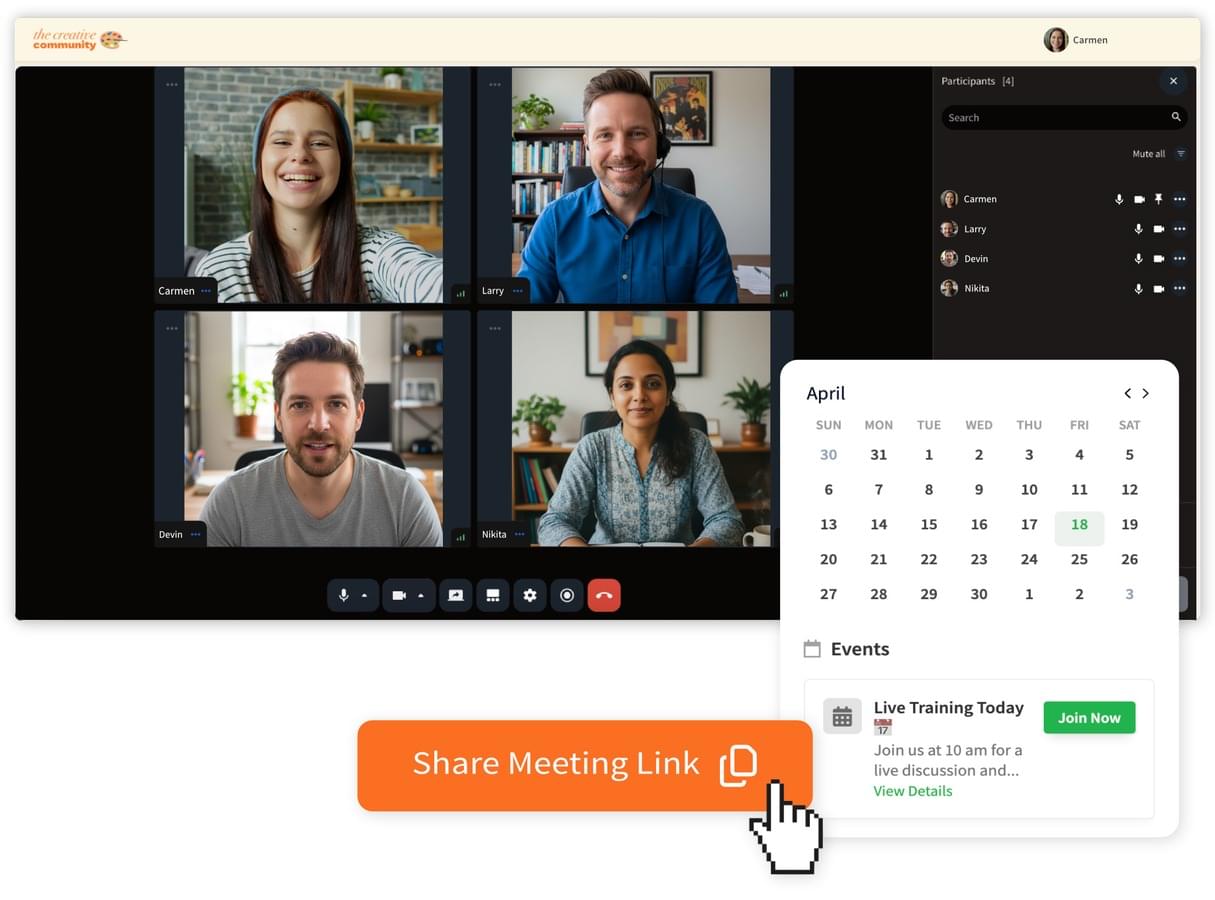
For example, one offer could include a course and access to a general community. Another offer could include additional channels, private discussions, or live sessions.
You decide how everything is packaged. When someone purchases an offer, they automatically gain access to the relevant community areas.
There is no need to manually invite them or adjust permissions across different tools. You can also create long-term memberships.
If you enable ongoing access, members will receive new content and community spaces as you add them. This works well for programs that evolve over time.
This structure gives you more control over how your community grows. Instead of being a standalone chat space, the community becomes part of a broader experience that includes content, learning, and interaction.
Pros of Hosting Your Membership Community in Heights vs Slack
As we mentioned earlier, the best platform depends on your needs.
Slack is the best choice if you are a team leader, CEO, remote work manager (and so on), and you need a place for your team to discuss, keep in contact and work together easily.
Heights Platform is not designed for work teams. It is designed for creators who are looking for an all-in-one solution to host their courses, digital product, and community space, and need the flexibility to sell access to content in different ways based on their business model.
With Slack, your community exists separately from your content, payments, and overall experience. You need additional tools to manage each part. This creates extra steps for both you and your members: people join in one place, learn in another, and interact somewhere else.
With Heights, everything is connected: members log in once and access everything from the same place. You can control how they move through your content, where they engage, and what they see next.
Instead of manually managing who is in your Slack workspace, access is tied directly to purchases and membership status.
In Heights, your community is part of your own program, not a shared workspace environment, and you have full control and style and branding.
Start Your Membership Community With Heights Platform
Slack can work well for communication, especially in small groups or internal teams.
But if you are a creator who runs (or is planning to start) a community membership business, communication is only one part of what you need. You need structure, content delivery, payments, branding, and an engaging experience for your members.
You also need a setup that supports growth without increasing your costs every time your community expands.
This is where Slack starts to create limitations, simply because Slack is built for work teams, not creators.
Heights Platform is the better solution for creators, as it offers all the features you need to start and grow a profitable online business.
In Heights, your community lives alongside your courses, digital products, and offers, creating one connected experience for your members. On top of this, you can create your entire website, start live meetings or sell access to paid webinars, and send marketing emails to your audience (and so much more!).
If you want to build a membership that feels organized, easy to navigate, and connected to your business, Heights Platform gives you a more complete foundation to do so. Try it out for yourself by creating your free account for 30 days! (no credit card needed!)
Start Free Today

