
Introducing Heights AI 3: Build, Connect, and Automate Your Creator Business
9 minute readHeights Platform is introducing Heights AI 3, the newest version of Heights AI: a tool that 10,000+ creators already use every day to build and grow their online knowledge business.
In this article, we'll cover what's new with Heights AI 3 and how it can help you in your business.
Before we get into the features, it is important to note the reasons and philosophy behind Heights AI.
In 2026-2027, AI can do almost anything for creative entrepreneurs. It can write for you, brainstorm new product ideas, generate code, automate jobs...
And for everybody else... AI makes it easier than ever to get access to information and learn new skills.
If you are an online course creator, a coach, a community builder, or anyone running a business online, AI is definitively a blessing, but for certain aspects, it can be a curse as well. Let us explain.
There are two main issues (or questions) that our team at Heights has been considering in the past months while building Heights AI 3:
- If everyone has access to the same AI tools, and everyone uses AI to create, why would customers buy from you instead of just getting the same results for free by asking ChatGPT or Claude?
- From the creator standpoint, AI can help reduce workload and become more productive, but there are still a lot of moving parts in your business that you have to piece together.
After seeing how thousands of creators use AI in their daily work, we've noticed a big disconnect between the things that actually save you time and the things that you still need to handle manually.
We've also noticed that while AI offers a big advantage to creators, it often happens that it replaces the most creative tasks and lets you deal with the boring, manual ones.
Shouldn't it be the other way around?
Keeping these issues in mind, our team started working on Heights AI 3, with one clear vision:
AI should be the tool that assists you in ways that really matter - it should not be a tool that replaces you and makes your content obsolete.

For example, see if this sounds familiar.
If you are a creator today, you probably use AI for a lot of things. You might ask it to help you write the copy for your landing page, suggest improvements for your videos, review blog posts, etc...
But then you still have to build everything.
You have to open your website builder and design the page. Create the course lesson by lesson. Format the lead magnet in a graphic design tool. Set up the emails. Connect the automation. Update your products. Manage your students. and so on!
And before you know it, what you actually enjoyed doing (creating, coming up with new ideas, designing) is being done by AI, and you're left handling the technical stuff.
That gap between getting an answer from AI and actually getting the work done is what we wanted to solve with Heights AI 3.
Not to mention that if the courses you sell, the videos you publish, or the articles you write are all being done by AI, why would your customers pay you?
That's why Heights AI 3 offers multiple tools to help you with the technical stuff, while you can focus on doing what you love, and sharing your unique insights with your audience, something that cannot be replaced.
Today, we’re introducing our biggest update to Heights AI yet.
Heights AI 3 is the AI built into your creator business.
You can tell it what you want to accomplish, and it can help you build, edit, and organize the pieces directly inside Heights Platform.
Create a lead magnet. Build a landing page. Set up an email automation. Update a course. Edit a product. Check how your students are progressing.
All from the same place where your business already lives.
Try Heights AI 3, FreeFrom AI Assistant to AI That Can Take Action
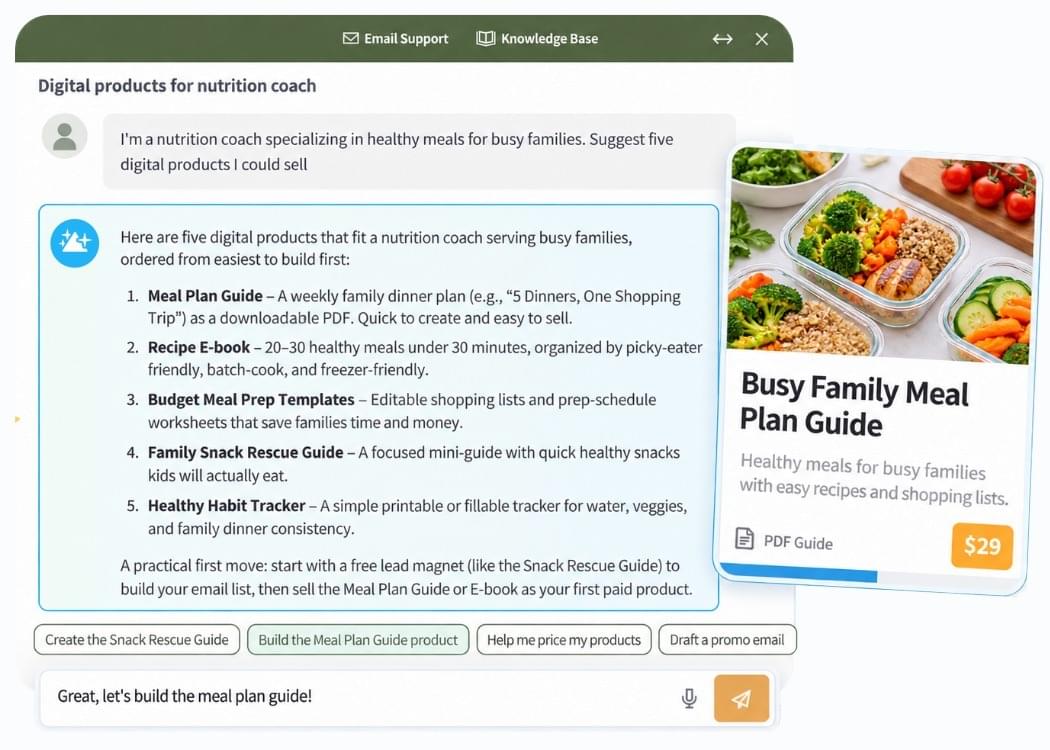
Since we first introduced Heights AI, our goal has been to make building an online knowledge business simpler.
The earlier versions of Heights AI could already help you brainstorm ideas, structure courses, generate products, design pages, answer questions about your business, and more.
With Heights AI 3, we’re taking a much bigger step.
The AI can now work across more areas of your Heights account and help you complete the actual task you are asking about.
For example, instead of asking:
“What emails should I send when someone downloads my lead magnet?” You can ask Heights AI to help you create the email automation itself.
Instead of asking:
“What should my lead magnet contain?” You can ask it to create the digital product and generate the downloadable PDF.
And instead of asking:
“How could I improve this page?” You can describe the changes you want and use Heights AI to help edit the page.
Build and Connect The Parts of Your Creator Business With Heights AI
Starting something new usually means making dozens of small decisions.
What should you sell? How should you structure it? What should the page look like? What emails do you need? What should you give away for free?
Heights AI 3 can help you move through these steps inside one platform. Let's see in more details what Heights AI can help you achieve:
Create an Offer Ready to Launch
Have an idea you want to teach? Ask Heights AI to help turn it into a structured product.
It can help you organize your idea, create your course structure, develop lessons, and set up the product inside Heights.
You can also work from content you already have.
Maybe you have a workshop, a collection of notes, an existing course, or material you have been teaching clients for years. Heights AI can help you turn that knowledge into something more structured and useful.
Generate Lead Magnets and Downloadable PDFs
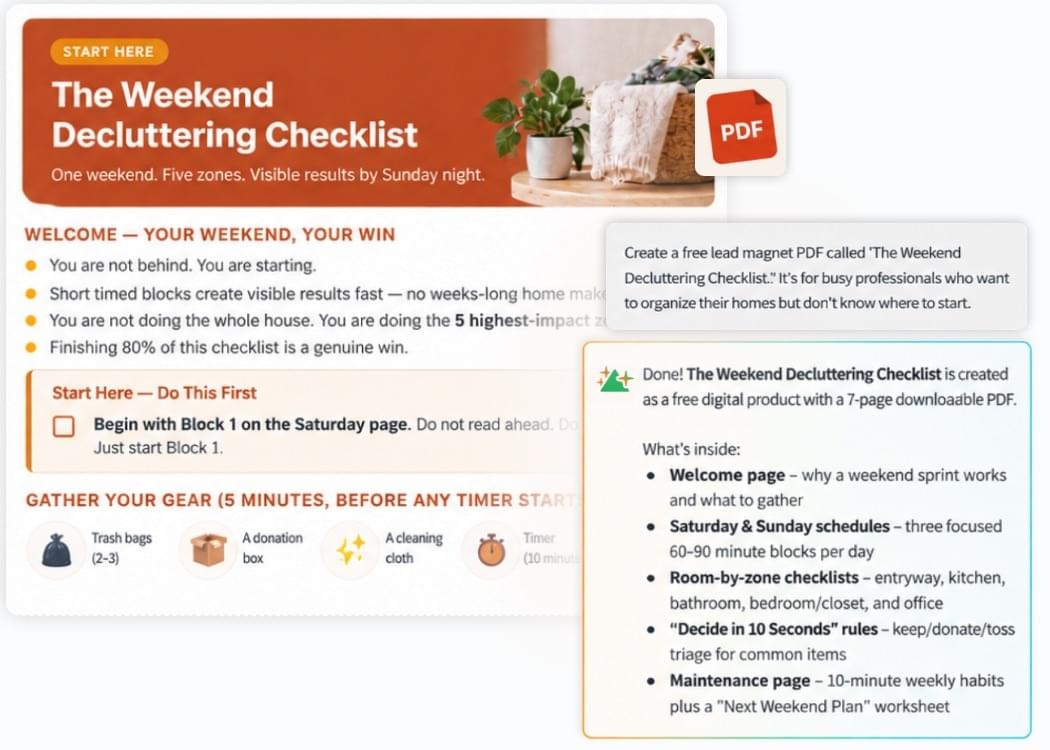
Creating a lead magnet often involves bouncing between an AI writing tool, a document editor, a design tool, file storage, your website, and your email platform.
Heights AI 3 brings all of that process together.
You can ask it to create a digital product and generate a downloadable PDF to go with it. For example:
“Create a beginner checklist with the 10 things someone should prepare before starting a vegetable garden.”
Heights AI can create the content and turn it into a multi-page downloadable resource.
Already generated one and want to make changes? You can continue the conversation and refine the PDF instead of starting again from scratch.
This gives creators a much faster way to create things like checklists, workbooks, guides, cheat sheets, free or paid digital downloads, etc...
Build Websites and Landing Pages
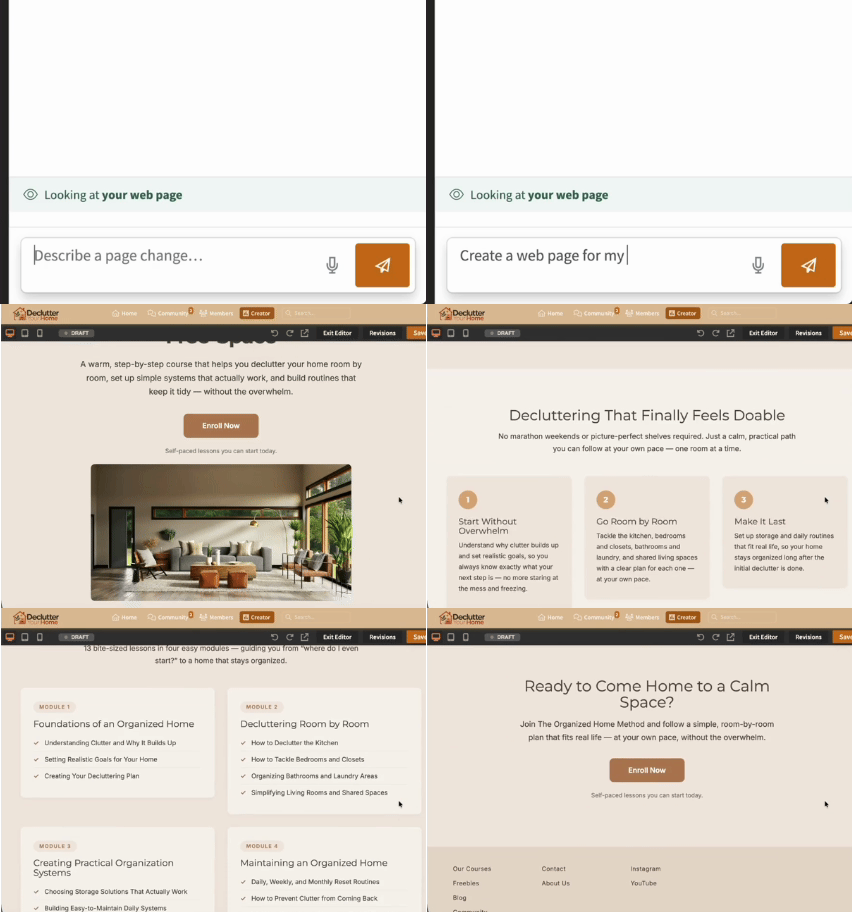
Your website is another place where Heights AI can do more of the work.
You can use AI to generate pages for your creator business and then continue editing them by describing what you want.
You might say:
“Make this section more focused on the result students get from the course.” Or: “Add a section underneath this one explaining what is included.” Or: “Change the style of this section to make the testimonial stand out more.”
This makes web design much more conversational. You can still make manual adjustments when you want precise control, but you no longer need to know how every website setting works before you can build something good.
Turn a PDF into an Online Course
Already have a PDF guide, ebook, or training material? With Heights AI, you can upload your PDF and turn it into a structured online course.
Heights AI helps transform your existing content into organized lessons, giving you a head start on creating a course from material you've already developed.
It's a simple way to repurpose your knowledge into a new product you can share or sell.
Edit Your Business by Talking to Heights AI
Building something is only the beginning. As you know, your business changes constantly: you might change your price, add a lesson to a course, launch a new product, give a student access to something, create a new page, and so on.
These small tasks add up quickly.
One of the biggest changes with Heights AI 3 is its ability to help with more of these everyday edits.
You can ask questions naturally and let Heights AI help you find and update the right part of your products inside your account.
For example:
“Change the price of my Watercolor Basics course to $49.”
“Add a lesson about choosing watercolor paper after lesson three.”
“Rewrite the headline on my course sales page to focus more on beginners.”
“Show me the students who haven't completed the first module yet.”
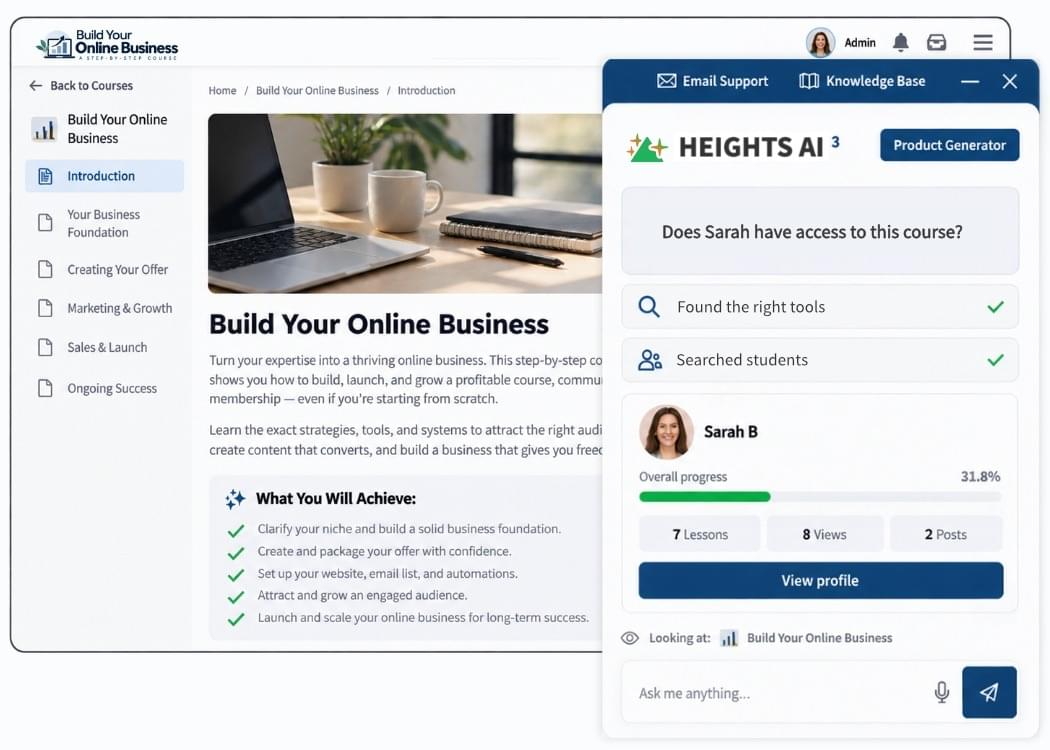
Instead of thinking about where a setting is located, you can focus on what you want to change.
That becomes especially valuable as your business grows and you have more products, pages, students, emails, and offers to manage.
Create Email Automations With AI
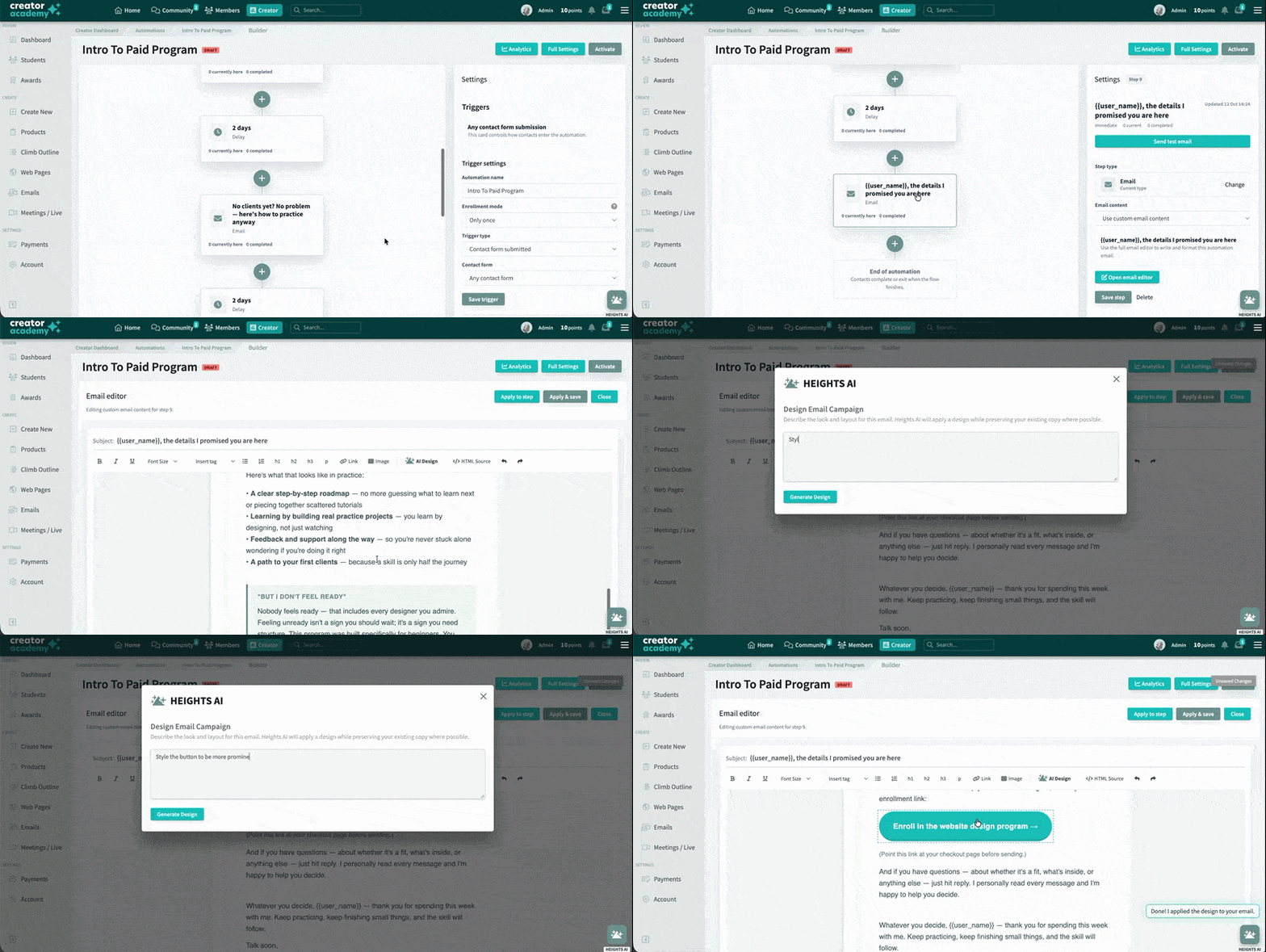
Writing an email with AI has become easy. But where many creators get stuck is building the system around those emails to automate them.
You need to decide when each email should be sent, create the messages, organize the sequence, configure the automation settings, review everything, and make sure it is properly connected to your products and website pages.
Heights AI 3 can help you build the workflow itself.
For example, you could ask:
“Create a welcome automation for students who enroll in my photography course.” Or: “Build an email sequence for people who download my free portrait photography checklist and introduce my paid course at the end.”
Heights AI can help create an editable automation draft, including the emails that belong inside it.
You can then review the workflow, make changes, test it, and activate it when you are ready.
This is an important part of how we think AI should work inside your business. You should be able to delegate the setup while still deciding what ultimately gets published or sent.
Connect the Pieces of Your Funnel Instead of Building Them Separately
A creator business has a lot of moving parts. And one of the benefits of this business model is the flexibility: there are hundreds of products and ways you can structure a digital product business!
But that also means a lot of complexity. For example, if you were to launch an online dog training business, you might need:
- A free puppy-training checklist to attract leads.
- A landing page where people can download it.
- An email sequence that welcomes those leads.
- A paid course teaching your full training method.
- A community where customers can ask questions.
- Live sessions where members can get additional help.
- A sales page connecting everything together.
Traditionally, you would build each piece separately and then figure out how they connect. That can become quite complicated, and definitely not something you want to devote your afternoons to when you are about to launch your business!
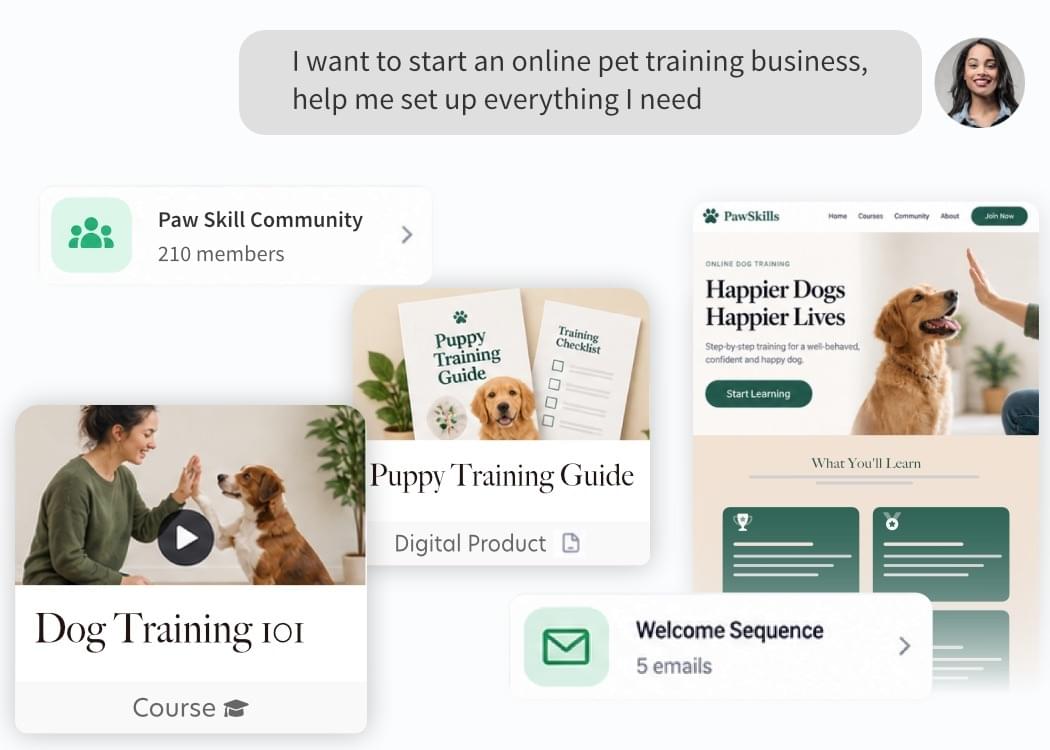
With Heights AI 3, you can get a clear picture of how your funnel and products work together, with what we call a setup map. For example, you could ask:
“I want to start an online pet training business. Help me set up what I need.”
From there, Heights AI can help you think through the offer and work with the different tools already available inside Heights.
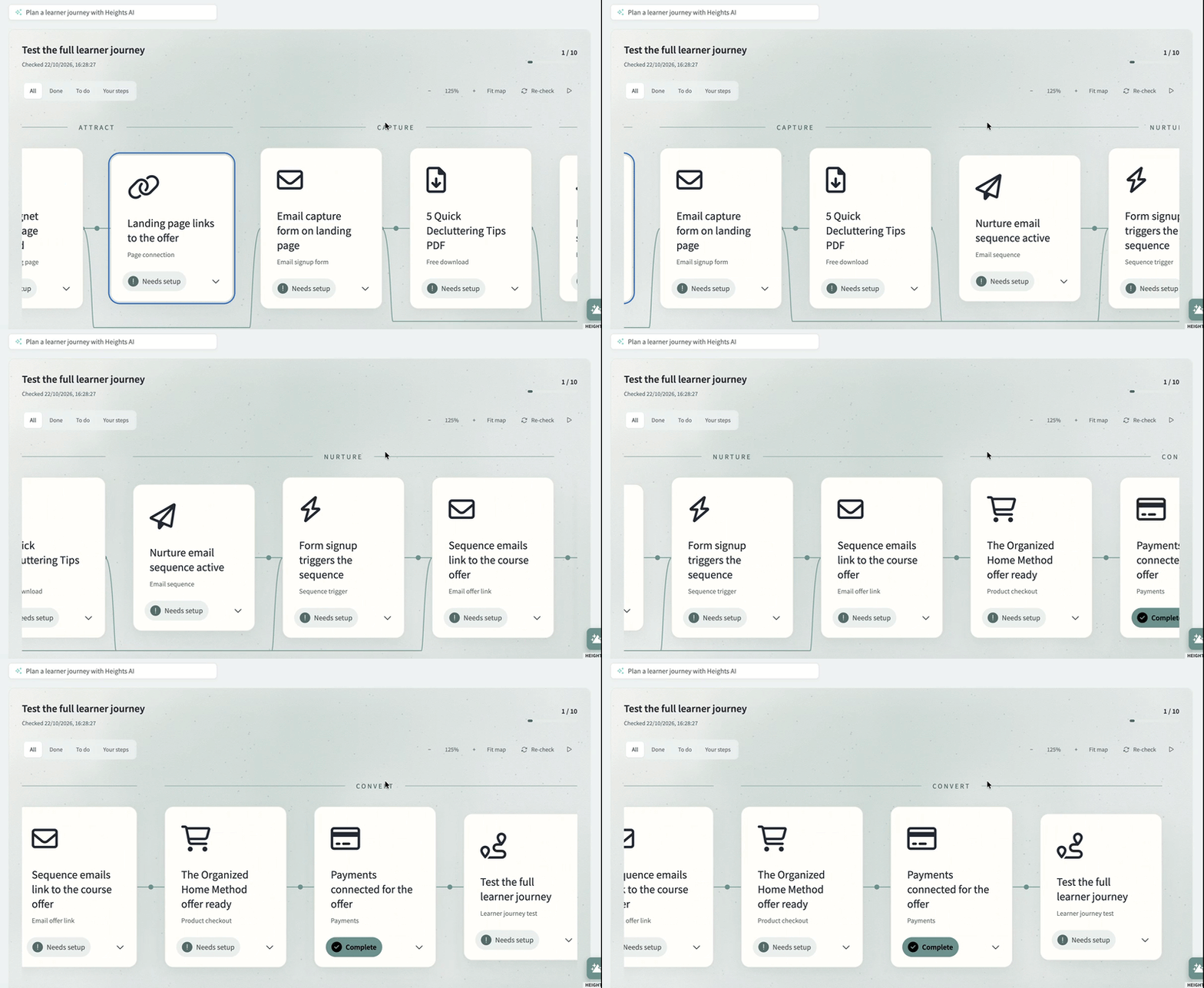
Heights AI already lives alongside your courses, website, community, products, students, emails, and other parts of your business, and it understands your funnel and what you're trying to build.
You can spend less time explaining your setup to an AI tool before it can give you a useful answer.
Grow Your Business With AI
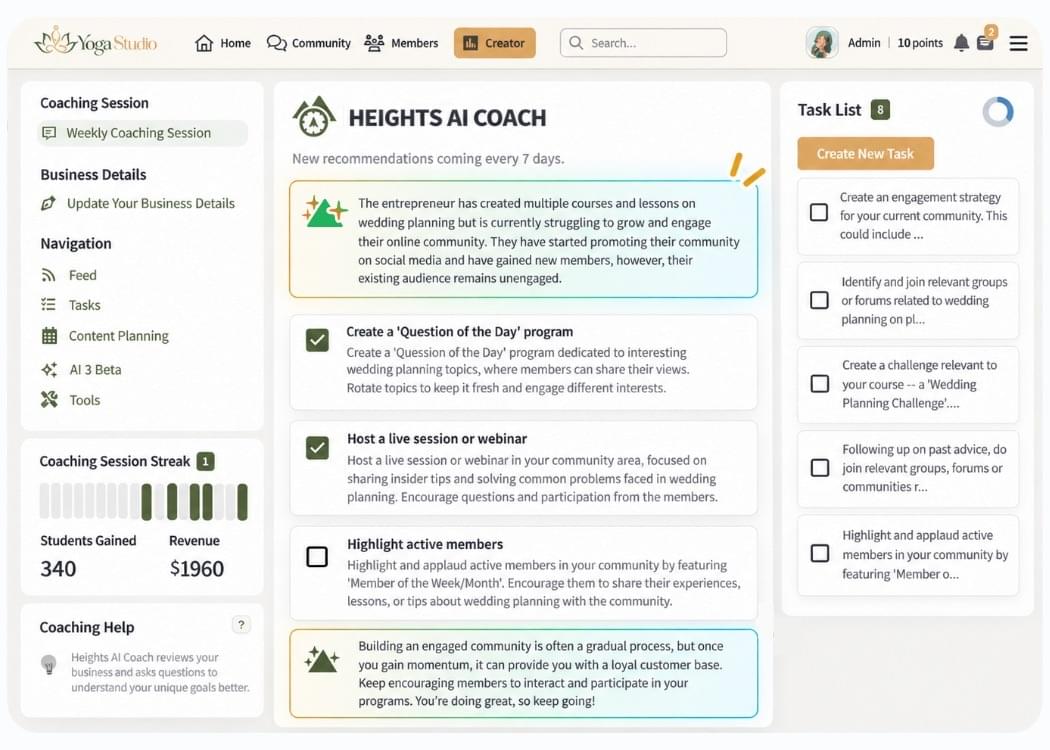
Another area where many creators get stuck is promoting their business after it launches, and finding ways to reach more customers.
That's where Heights AI Coach comes in.
Heights AI Coach is your personal business coach, built directly into Heights Platform. It helps you make better decisions, identify opportunities for growth, and figure out what to focus on next.
Because Heights AI Coach understands your business and its goals, you can get guidance tailored to your situation instead of generic business advice.
You can chat with the coach and share your progress and pain points, and ask questions like: "How can I get more students to enroll in my course?" or "What should I focus on next to grow my business?"
Your AI Coach can help you develop marketing strategies, improve your offers, understand your students, and plan your next steps with tasks to complete.
And with Heights AI 3, you can go from discussing an idea with AI to asking it to help you put that idea into action.
Final Thoughts: Keep Your Creativity, Heights AI Handles the Rest
We believe creators should spend more of their time on the things they are uniquely good at (teaching, creating, talking to customers, coming up with new ideas, building relationship)
Setting up another automation or spending an afternoon formatting a PDF probably isn't the reason you became a creator.
That is the work we want Heights AI to help you delegate.
Heights AI 3 brings AI closer to the actual operation of your creator business, giving you one place to build products, make changes, automate marketing, manage students, and keep moving your ideas forward.
Our goal with Heights AI 3 is for you to keep your creativity and delegate the setup instead.
To better understand how Heights AI can help you in your business, try giving it a bigger goal.
We've seen that many creators, when they integrate with AI, including Heights AI, limit their questions to a small task.
Instead of asking only for a paragraph of copy, ask it to help you accomplish something bigger.
Try prompts like:
“Help me turn my existing course into a free lead magnet.”
“Create a welcome email automation for my new students.”
“Build a landing page for my free workshop.”
“Help me create a course from my existing workshop notes.”
“Create a workbook to go with my course.”
“Review my sales page and help me improve it.”
“Show me how my students are progressing.”
“Help me create a new offer using my existing products.”
See What You Can Build With Heights AI
There are far more ways to use Heights AI than we could fit into one article. We put together a library of 100+ things you can ask Heights AI to help you do, with example prompts covering offers, courses, lead magnets, websites, communities, email marketing, and more.
Explore 100+ Heights AI example prompts
Or open Heights AI inside your account and start with a simple prompt: “Here is what I want to build…”
Heights AI is part of Heights Platform, the all-in-one platform for creators to build communities, sell digital products, and market their business.
You can try Heights (and Heights AI) completely free for 30 days, no need to add a credit card!
Try Heights AI 3

